

How to Master Google Flights – Traveler’s Guide to Finding the Best Airfare
If you’ve ever spent hours jumping between airline websites, price aggregators, and discount apps trying to find the cheapest flight — you’re not alone. Airfare pricing can feel like a dark art. But for savvy travelers, Google Flights has quietly become one of the most powerful tools for finding great deals, tracking prices, and understanding the patterns behind airfaretrends.
This guide will show you how to get the most out of Google Flights — its strengths, best practices, and a few limitations you should know before you book your next adventure.
🌍 What Is Google Flights?
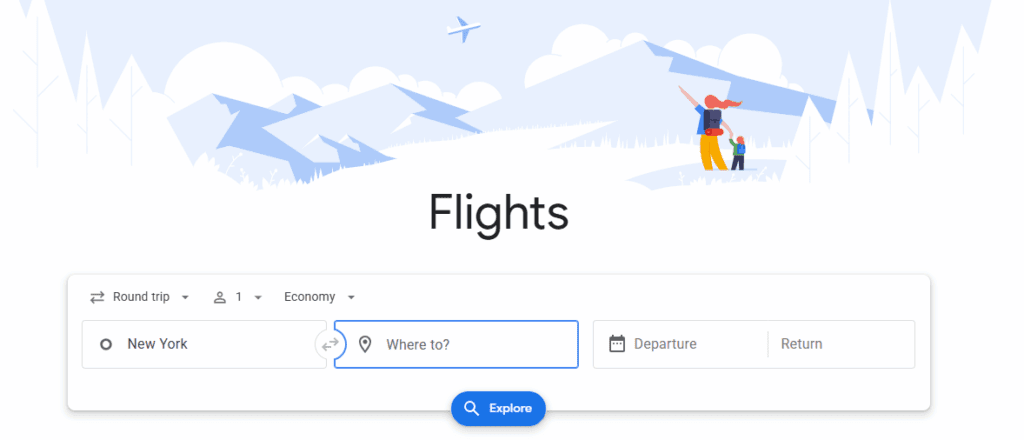
Google Flights is a free search engine that pulls data from hundreds of airlines and online travel agencies in real time. It doesn’t sell tickets directly — instead, it helps you find the best routes, compare prices, and connect you to the airline or travel site to book.
What sets it apart is its speed, simplicity, and intelligence. You can type in “New York to Paris” and instantly see prices across multiple days, airlines, and airports — all displayed in a clean, easy-to-use interface.
Search Vacation Homes

🔍 Why Google Flights Stands Out
1. Lightning-Fast Search and Comprehensive Results
Unlike some travel sites that take forever to load, Google Flights shows results almost instantly. It compiles data from major airlines, regional carriers, and many third-party booking sites, offering one of the broadest overviews of available flights.
2. Powerful Filters
Want to fly only nonstop? Prefer to avoid a certain airport? Need to check bag prices upfront? Google Flights lets you filter by stops, airlines, times, layovers, flight duration, and even carbon emissions — all in a few clicks.
3. Smart Price Tracking
This is where Google Flights truly shines. You can turn on price tracking for a route, and Google will automatically email you when fares drop or are expected to rise. It’s like having a personal airfare assistant watching the skies for you.
4. Visual Pricing Tools
The calendar view and price graph are visual gold. Instead of guessing which dates are cheapest, you can literally see which days offer the lowest fares. Want to save a few hundred dollars? Often, simply shifting your trip by one or two days can do it.
5. Price Insights and Forecasting
Google Flights uses historical data to tell you whether the fare you’re seeing is typical, high, or low compared to past averages. You’ll often see messages like “Prices are lower than usual for this route” or “Prices are unlikely to drop before departure.” While not a guarantee, it helps you book with confidence.

🧭 Best Practices: How to Get the Most Out of Google Flights
1. Start Broad, Then Narrow Down
When you first search, leave your dates open. Use the calendar to spot the cheapest windows to travel. Then, once you’ve found the sweet spot, fine-tune your options by airline, duration, or layover preference.
2. Use the Explore Map Feature
If your travel dates are fixed but your destination is flexible, click on “Explore” in the top menu. You’ll get a map showing prices to cities all over the world. It’s one of the best ways to find spontaneous deals — think “Europe under $500” or “Tropical escapes under $300.”
3. Turn On Price Alerts
Once you’ve picked your route, toggle the switch to track prices. You’ll receive automatic email updates whenever the price changes. This is especially useful for popular routes that fluctuate daily.
4. Check Alternative Airports
Sometimes flying into a nearby airport can save hundreds. Google Flights automatically suggests alternatives, like “Try Oakland instead of San Francisco” or “Consider Gatwick instead of Heathrow.”
5. Mix and Match Airlines
Because Google Flights doesn’t lock you into a single carrier, you can easily create multi-airline itineraries — such as flying out with Delta and returning with United — often at lower total cost.
6. Use Incognito Mode (Sometimes)
While Google Flights itself doesn’t manipulate fares based on your search history, third-party booking sites you click through to might. If you notice prices changing strangely after repeated searches, try using an incognito browser tab or clear your cookies before booking.
7. Compare With Airline Websites Before Booking
Once you’ve found your flight, it’s usually best to book directly with the airline rather than through an online agency. You’ll get better customer service, easier cancellations, and ensure your loyalty points or upgrades count.

⚠️ The Shortcomings: Where Google Flights Falls Short
Even the best tools have limits. Here are a few places where Google Flights can’t do everything:
1. Missing Budget Airlines
Not every airline participates in Google’s system. Southwest Airlines in the U.S., for example, keeps its fares off all third-party platforms. You’ll need to check their website separately. In Europe, some ultra-budget carriers like Ryanair or Wizz Air may appear inconsistently.
2. No Bundled Packages
If you’re hoping to book a flight + hotel bundle or earn extra savings through vacation packages, Google Flights won’t help much. Sites like Expedia, Priceline, or Hopper sometimes offer extra discounts when you combine travel components.
3. Limited Loyalty and Upgrade Options
Because Google Flights is a search engine — not a booking platform — you can’t directly apply loyalty perks or request upgrades through it. Those benefits only kick in when booking directly with the airline.
4. Price Forecasts Are Educated Guesses
When Google says “prices are unlikely to drop,” remember that’s based on historical averages — not insider data. Airlines change fares dynamically based on demand, seasonality, and even competitor moves.
5. Occasional Glitches or Outdated Links
Sometimes a fare you see on Google Flights isn’t available once you click through to book. That’s rare, but it happens, especially with smaller online travel agencies that update their data less frequently.
Search Vacation Homes
🧳 Pro Tips from Frequent Flyers
Book at the Right Time: Generally, the best window for domestic U.S. flights is 1–3 months ahead; for international, about 3–6 months ahead. Use Google’s price alerts to monitor this window without stress.
Use “Flexible Dates” to Your Advantage: Even a one-day change can alter fares drastically — especially around weekends or holidays.
Watch for Shoulder Seasons: Google Flights makes it easy to visualize how prices rise and fall through the year. Flying just before or after peak season can save hundreds.
Don’t Ignore Flight Duration: Cheap fares with 20-hour layovers might not be worth the savings. Use filters to limit total travel time.
Combine With Other Tools: Pair Google Flights with services like SeatGuru (for seat maps) or ExpertFlyer (for upgrade alerts) if you want deeper insights.
💬 The Bottom Line
Google Flights isn’t just a flight search engine — it’s a travel strategy tool. Whether you’re planning a dream vacation or a last-minute business trip, it helps you make data-driven decisions instead of guessing when to book.
Its simplicity, transparency, and real-time updates make it one of the most reliable ways to find fair pricing and track airfare trends. While it’s not perfect — missing some low-cost carriers and bundled deals — it’s hard to beat for speed, clarity, and control.
So before your next trip, skip the chaos of endless tabs and conflicting prices. Open Google Flights, explore a few destinations, turn on price alerts, and let the system do the heavy lifting.
Your next great deal might just be an algorithm away.
For more inspiration check out Fly for Less: Hacks for Discount Travel